Category: Networking
Skills: OSPF, Routing,
Equipment: Aruba CX Virtual Switches, Virtual PC’s, Eve-Ng
Objective
- Learn the basics of OSPF routing
- Configure OSPF on 4 seperate Layer 3 switches
Topology
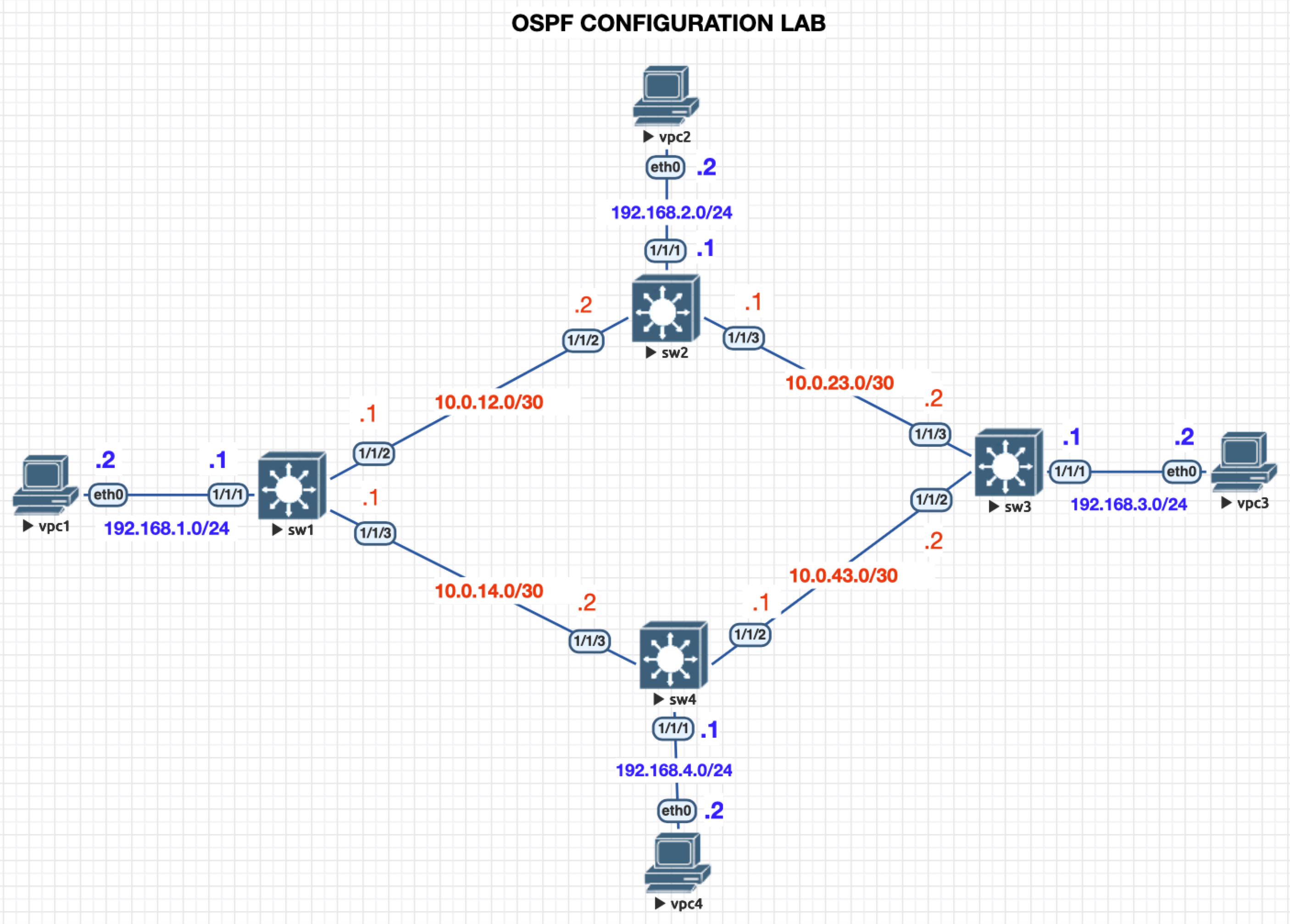
Devices
- 4 x Aruba CX Switches (Virutal)
- 4 x Virtual PCs
Steps
- Setup your lab enviroment based on the topology above
- Turn on all nodes
- If using EVEng (Click “More Actions” on the side and “Start all nodes”
- You will need to confiugre each switch
- Hostname
- Interface IP
- Enable interfsces
- Configure OSPF Routing
- Test Pinging different PCs
- Explorer useful commands
Configure Switches Hostname & Interface IP Addresses
sw1
switch(config)# hostname sw1

sw1(config)# int 1/1/1
sw1(config-if)# ip address 192.168.1.1/24

sw1(config-if)# int 1/1/2
sw1(config-if)# ip address 10.0.12.1/30

sw1(config-if)# int 1/1/3
sw1(config-if)# ip address 10.0.14.1/30

sw1(config-if)# int 1/1/1-1/1/3
sw1(config-if-<1/1/1-1/1/3>)# no shutdown
sw2
switch(config)# hostname sw2

sw2(config)# int 1/1/1
sw2(config-if)# ip address 192.168.2.1/24

sw2(config-if)# int 1/1/2
sw2(config-if)# ip address 10.0.12.2/30

sw2(config-if)# int 1/1/3
sw2(config-if)# ip address 10.0.23.1/30

sw2(config-if)# int 1/1/1-1/1/3
sw2(config-if-<1/1/1-1/1/3>)# no shutdown
sw3
switch(config)# hostname sw3

sw3(config)# int 1/1/1
sw3(config-if)# ip address 192.168.3.1/24

sw3(config-if)# int 1/1/2
sw3(config-if)# ip address 10.0.43.2/30

sw3(config-if)# int 1/1/3
sw3(config-if)# ip address 10.0.23.2/30

sw3(config-if)# int 1/1/1-1/1/3
sw3(config-if-<1/1/1-1/1/3>)# no shutdown
sw4
switch(config)# hostname sw3

sw4(config)# int 1/1/1
sw4(config-if)# ip address 192.168.4.1/24

sw4(config-if)# int 1/1/2
sw4(config-if)# ip address 10.0.43.1/30

sw4(config-if)# int 1/1/3
sw4(config-if)# ip address 10.0.14.2/30

sw4(config-if)# int 1/1/1-1/1/3
sw4(config-if-<1/1/1-1/1/3>)# no shutdown
Configure Virtual PCs Hostname & Interface IP Addresses
vpc1
VPCS> set pcname vpc1

vpc1> ip 192.168.1.2/24 192.168.1.1
         IP ADDRESS     DEFAULT GATEWAY
vpc2
VPCS> set pcname vpc2

vpc2> ip 192.168.2.2/24 192.168.2.1
         IP ADDRESS     DEFAULT GATEWAY
vpc3
VPCS> set pcname vpc3

vpc3> ip 192.168.3.2/24 192.168.3.1
         IP ADDRESS     DEFAULT GATEWAY
vpc4
VPCS> set pcname vpc4

vpc4> ip 192.168.4.2/24 192.168.4.1
         IP ADDRESS     DEFAULT GATEWAY
Configure OSPF
- We will set the OSPF proccess id as 1
- We will set the Router-ID to the following (this can be anything it is not an IP address)
- sw1 = 1.1.1.1
- sw2 = 2.2.2.2
- sw3 = 3.3.3.3
- sw4 = 4.4.4.4
- we will setup area 0 (This is the backbone)
sw1
sw1(config-ospf-1)# router ospf 1
sw1(config-ospf-1)# router-id 1.1.1.1

sw1(config-ospf-1)# int 1/1/1-1/1/3
sw1(config-if-<1/1/1-1/1/3>)# ip ospf 1 area 0
OSPF Area is not configured.
Do you want to create (y/n)? y
sw2
sw2(config)# router ospf 1
sw2(config-ospf-1)# router-id 2.2.2.2

sw2(config-ospf-1)# int 1/1/1-1/1/3
sw2(config-if-<1/1/1-1/1/3>)# ip ospf 1 area 0
OSPF Area is not configured.
Do you want to create (y/n)? y
sw3
sw3(config)# router ospf 1
sw3(config-ospf-1)# router-id 3.3.3.3

sw3(config-ospf-1)# int 1/1/1-1/1/3
sw3(config-if-<1/1/1-1/1/3>)# ip ospf 1 area 0
OSPF Area is not configured.
Do you want to create (y/n)? y
sw4
sw4(config)# router ospf 1
sw4(config-ospf-1)# router-id 4.4.4.4

sw4(config-ospf-1)# int 1/1/1-1/1/3
sw4(config-if-<1/1/1-1/1/3>)# ip ospf 1 area 0
OSPF Area is not configured.
Do you want to create (y/n)? y
Activities
- From vp1 ping vpc3 (192.168.3.2)
- Was it sucessful?
- use the command
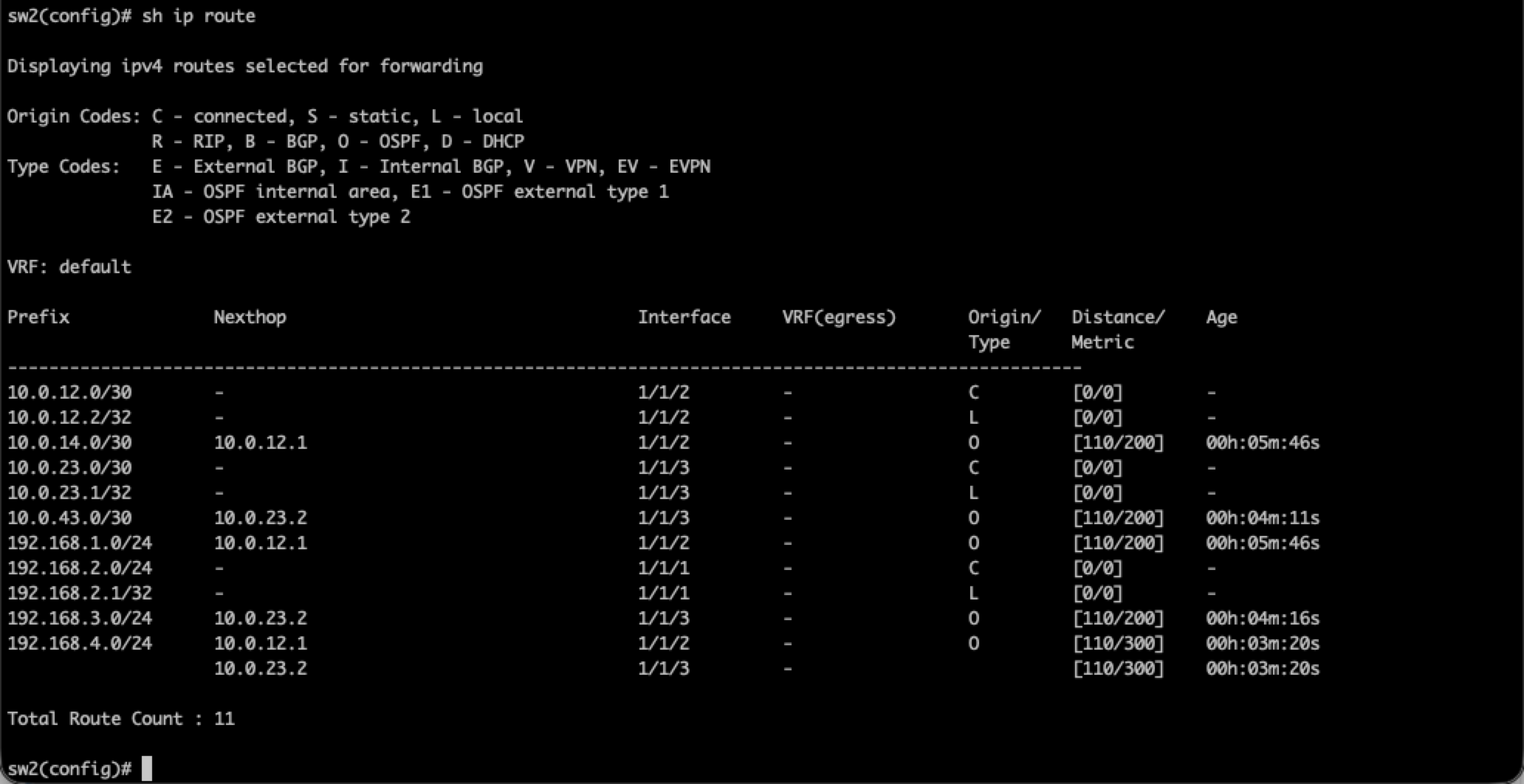
sh ip routeYou should see several routes- Routes with orgin/Type is OSPF routes
- Anoher good command is
sh ip ospf neighbors
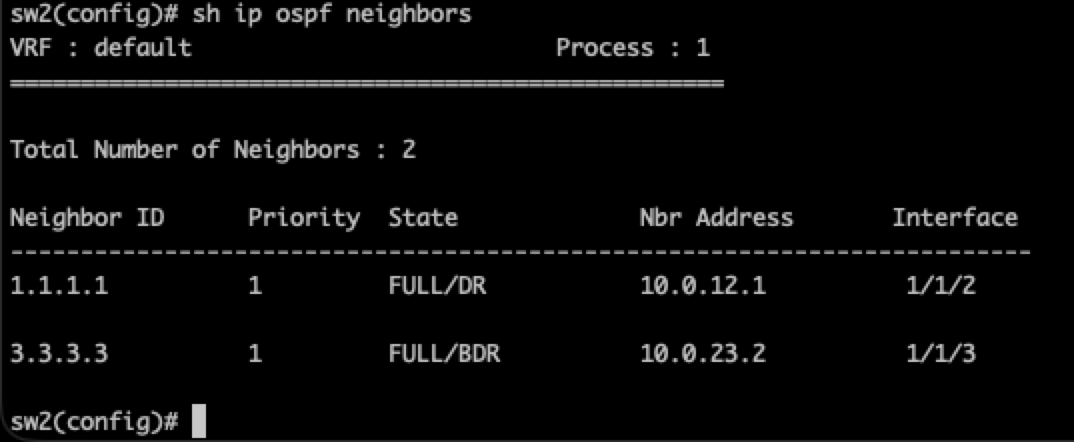
- Here you will see DR and BDR
- DR = Designated Router
- Acts as the hub for LSAs on that network
- Chosen by highest priority (default is 1, 0-255)
- BDR = Backup Designated Router
- Takes over if the DR goes down
- DR = Designated Router
Common Commands for OSPF
router ospf <process id>router-id <0.0.0.0>ip ospf <process id> area <area number - Usually 0>sh ip routedsh ip ospf neighborssh ip ospf interfacesh interface briefLess common for ospf
Common issues
- Wrong subnet mask at one end
- Duplicate IP on a segment
- Wrong netowrk at one end of a segment